Discover how coding agents for beginners can simplify website and app development in 2026. Learn how AI coding agents help beginners write code, fix errors, and build projects with less programming experience. Explore their benefits, limitations, and how to get started with AI-powered coding tools.
But does that mean anyone can now build a professional website or app with zero effort? Not quite. This guide breaks down what AI Coding Agents actually are, how they work, what beginners can realistically achieve with them in 2026, and what skills still matter even with AI doing the heavy lifting.
What Are AI Coding Agents?
AI coding agents do more than suggest code. They understand English goals and handle multi-step development solo. They write files, run commands, test, and fix bugs.
In practice, an AI coding agent can help with:
- Writing code: Generating a webpage, a form, or a full feature from a text description
- Explaining code: Breaking down what an unfamiliar block of code does, line by line
- Debugging errors: Reading an error message and suggesting or applying a fix
- Building features: Adding a login page, a shopping cart, or a search bar to an existing project
- Editing existing projects: Modifying files across an entire codebase, not just one file at a time
- Testing and improving applications: Running checks, catching bugs, and suggesting performance or security improvements
This is an evocative step up from older “AI code suggestion” tools that only forecast the next few lines as you typed.
How Do AI Coding Agents Work?
The basic idea is simple: you describe what you want, and the AI handles much of the technical implementation.
A distinctive workflow looks like this:
Idea → Requirements → AI Coding Assistance → Build → Test → Debug → Human Review
- You start with an idea (“I want a portfolio website with a homepage, projects page, and contact form”).
- You describe your requirements as clearly as possible.
- The AI coding agent for beginners generates the code, project structure, and files needed.
- It builds and often runs the project so you can preview it.
- It tests basic functionality and flags errors.
- It debugs issues it finds, or that you point out.
- You reviews the output, checks that it actually does what was intended, and makes final adjustments.
That last step matters. AI agents can move fast, but they don’t substitute the finding of a person checking whether the result is correct, protected, and genuinely practical.
AI Coding Agents vs Traditional Coding Assistants
It helps to separate two categories that often get taken together:
- Basic AI code suggestion tools predict the next line or block of code as you type, based on the context of the file you’re working in. They speed up typing but don’t independently plan or execute multi-step tasks.
- AI Coding Agents can take a broader instruction, plan the steps needed, work across multiple files in a project, run and test the code, and correct mistakes with limited human input at each step.
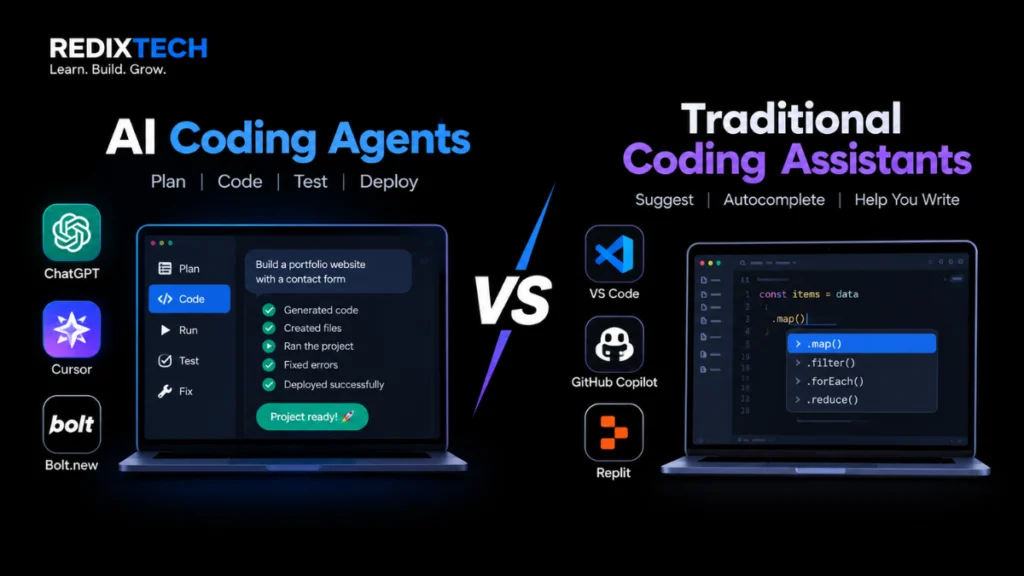
Industry commentators on the 2026 coding-tool landscape characterize AI coding agents as self-sufficient developer assistants, capable of performing tasks such as planning, editing an entire code repository, testing, and committing changes with significantly less direct guidance from a human than would be practical using an autocorrect assistant. Some tools go further, allowing multiple agents to collaborate on a task, dividing the work between them and outputting code that can be exported to other platforms, reducing the user’s dependence on any one tool.
Can Beginners Really Build Websites and Apps With AI?
Realistically yes, to a meaningful degree, but not without limits.
AI Coding Agents in 2026 can genuinely help beginners by using AI coding tools:
- Understand coding concepts by explaining generated code in plain language
- Generate basic project structures (folders, files, starting templates)
- Create website sections like headers, navigation menus, and contact forms
- Build simple applications such as to-do lists, calculators, or trackers
- Fix common, well-defined errors
- Learn by working through real, practical projects instead of only theory
At the same time, one review of 2026 tools points out a useful distinction: for well-scoped, clearly specified tasks, AI agent output can reasonably be used after review, but for open-ended, architecturally significant changes, it should be treated as a first draft that still needs real human oversight. A beginner asking for a simple landing page is a well-scoped task. A beginner asking for a complex, production-ready platform is not and AI won’t reliably deliver that without real technical understanding guiding it.
AI does not remove the need to understand the basics of how websites, apps, code, testing, and security work. It shifts some of the typing and boilerplate work to the AI, but the person building the project still needs to know enough to judge whether the output is correct and safe to use.
How Beginners Can Use AI to Build Websites
Some realistic starter projects for beginners using AI coding agents include:
- Portfolio websites: To showcase projects, skills, and resumes
- Landing pages: Single-page sites promoting a product, event, or service
- Business websites: Simple multi-page sites with information, services, and contact details
- Blog websites: Content-focused sites with posts and categories
- Simple web tools: Calculators, converters, or small utilities
Whatever the project, it’s important to test the final website thoroughly before publishing checking that links work, forms submit correctly, the layout holds up on mobile devices, and there are no broken pages.
How AI Can Help Build Apps
For app development, AI coding agents can assist beginners with:
- Planning app features: Turning a vague idea into a list of concrete features
- Creating user interfaces: Generating screens, buttons, and layouts
- Writing code: Producing the underlying logic for those features
- Debugging: Identifying why a feature isn’t working as expected
- Connecting APIs: Linking the app to external services like weather data, payments, or maps
- Testing basic functionality: Checking that core features work as intended
Not every app can be built successfully with a single prompt. Simple apps with a handful of features are achievable for beginners. Complex apps ones involving advanced security, large-scale data handling, or intricate business logic usually need real technical knowledge, careful planning, and multiple rounds of revision, not one perfect prompt.
AI Coding Agents vs No-Code Tools
Beginners in 2026 generally have three broad paths:
| Approach | Best for | Trade-offs |
| AI Coding Agents | People who want real, editable, exportable code and are willing to learn some fundamentals | More flexible and educational, but requires understanding output to fix issues |
| No-Code Platforms | People who want a working result fast with minimal technical involvement | Quick and visual, but often limited in customization and can lock you into the platform |
| Traditional Coding | People aiming for full control and long-term technical skill | Slowest to start, but gives the deepest understanding and flexibility |
No-code AI application builders have also seen significant progress in 2026. A few companies have appeared that allow non-technical users to transform spreadsheet data into decent-looking web applications with minimal design effort, for those who want to get something working quickly and do not need to invest much into the process. A coding agent that would generate readable code would be more valuable to a beginning programmer wanting to learn the craft than a no-code solution, despite the extra work involved.
Do Beginners Still Need to Learn Coding?
Yes, and this is one of the most important realities of using AI coding tools well. AI can generate code, but it can’t replace understanding of the fundamentals that let you judge, fix, and extend that code. Core areas worth learning include:
- HTML: The structure of web pages
- CSS: Styling and layout
- JavaScript: Interactivity and logic in the browser
- Programming logic: Variables, loops, conditionals, functions
- APIs: How applications talk to other services
- Databases: How data gets stored and retrieved
- Debugging: How to read errors and trace problems
The good news is that beginners don’t need to master all of this before starting. It’s realistic to start building with AI assistance right away, and gradually learn the technical concepts behind each project as you go using the AI’s explanations as a learning tool, not just a code generator.
Skills Students Should Learn Alongside AI Coding
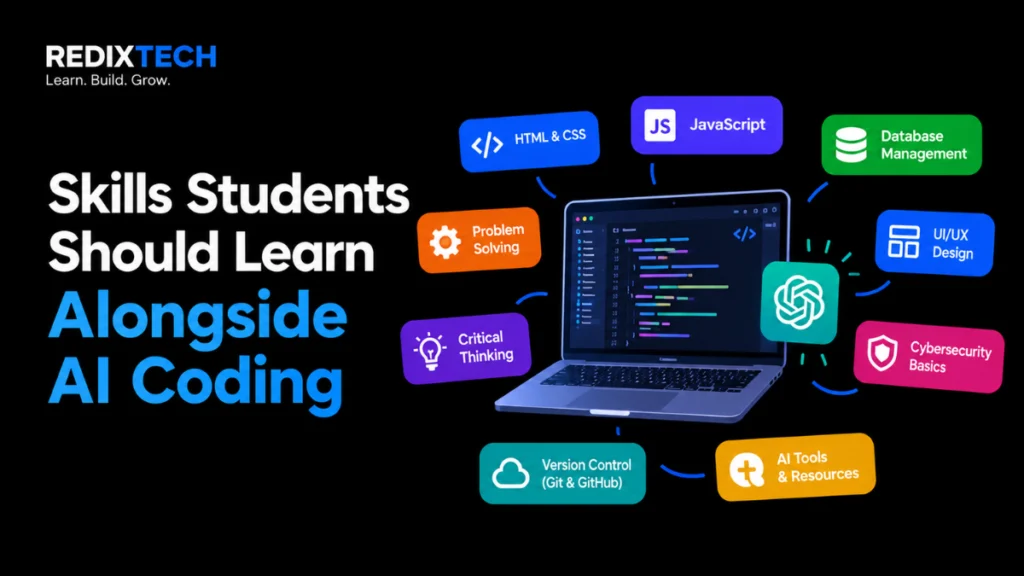
Beyond the core web fundamentals, a few additional skills make a real difference in how effectively someone can use AI coding agents:
- Problem-solving: Break a big idea into smaller, buildable pieces
- Programming fundamentals: A basic grasp goes a long way
- Prompting and clear requirements: Describe what you want precisely enough for the AI to build it correctly
- Debugging: Knowing how to investigate when something breaks
- UI/UX basics: Understand what makes an interface usable
- APIs: Connect apps to outside data and services
- Database basics: Structuring and querying data
- Testing: Checking that a project actually works before shipping it
- Git and version control: Track changes and avoiding losing work
- Cybersecurity awareness: Recognize common risks like exposed credentials or unvalidated user input
Benefits of AI Coding Agents for Beginners in 2026
Used well, AI coding agents offer real advantages:
- Faster learning: Instant explanations of unfamiliar code
- Coding assistance: Help writing code without starting from a blank file
- Faster prototyping: Turning an idea into a working demo quickly
- Error explanations: Plain-language breakdowns of what went wrong
- Productivity support: Less time spent on repetitive setup work
- Help with repetitive tasks: Boilerplate code, formatting, and routine fixes handled automatically
Industry data reflects this shift: developer adoption of AI coding tools has risen sharply over the past year, a sign that even experienced programmers are leaning on these tools, not just beginners.
Limitations and Risks
AI coding agents are powerful, but they come with real limitations that beginners should take seriously:
- Incorrect or broken code: AI can generate code that looks correct but doesn’t actually work
- Security vulnerabilities: AI-generated code can include weaknesses that a beginner may not know to check for
- Dependency on AI: Over-relying on AI without learning fundamentals can leave you stuck when something needs a manual fix
- Difficulty understanding generated code: Complex AI output can be hard for a beginner to follow or maintain
- Outdated or incorrect solutions: AI models can suggest approaches that are no longer current or correct
- Privacy concerns: Sharing sensitive code or data with an AI tool always carries some risk
Testing and human review are essential at every stage. AI-generated code should be treated as a draft to verify, not a finished, trustworthy product by default.
How Students Can Build a Portfolio Using AI
AI coding agents make it realistic for students to build a portfolio of original, functional projects, such as:
- A personal portfolio website
- A to-do list application
- An expense tracker
- A small business website
- An AI-powered productivity tool
- A simple web application solving a specific problem
The key is understanding and being able to explain each project how it works, why it was built that way, and what challenges came up rather than presenting AI-generated work as expertise you can’t actually demonstrate. In interviews or portfolio reviews, being able to walk through your own project confidently matters far more than how much of the code AI helped write.
Beginner Learning Roadmap
A simple, realistic path for getting started:
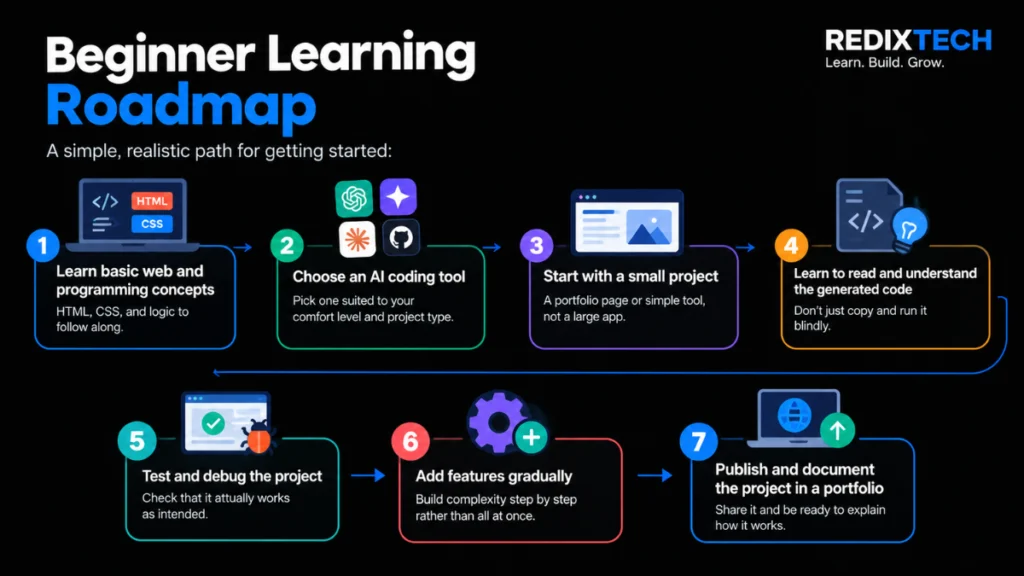
- Learn basic web and programming concepts: HTML, CSS, and logic to follow along
- Choose an AI coding tool: Pick one suited to your comfort level and project type
- Start with a small project: A portfolio page or simple tool, not a large app
- Learn to read and understand the generated code: Don’t just copy and run it blindly
- Test and debug the project: Check that it actually works as intended
- Add features gradually: Build complexity step by step rather than all at once
- Publish and document the project in a portfolio: Share it and be ready to explain how it works
Frequently Asked Questions
What are AI Coding Agents?
AI Coding Agents are AI tools that can plan and carry out multi-step coding tasks writing, editing, testing, and debugging code based on instructions described in plain language, rather than just suggesting the next line of code.
Can beginners build a website using AI?
Yes, for realistic projects like portfolios, landing pages, and simple business sites. Beginners can generate a working site quickly, though testing and some understanding of the fundamentals are still needed to fix issues and publish safely.
Can AI build a complete app?
AI can build simple, well-defined apps fairly well. More complex apps with advanced features, security requirements, or large-scale data still need real technical planning and review.
Do I need to learn coding if I use AI?
Yes. AI reduces how much code you need to type manually, but understanding the fundamentals is what lets you judge whether AI-generated code is correct, secure, and doing what you intended.
Are AI Coding Agents free?
Many offer free tiers with limited usage, alongside paid plans for more advanced features or heavier use. Pricing and free-tier limits vary by tool and change frequently, so it’s worth checking current pricing pages before committing.
Can AI replace web developers?
No. AI can speed up and assist development work, but it doesn’t replace the judgment, planning, security awareness, and problem-solving that experienced developers bring, especially on larger or more complex projects.
What skills should beginners learn alongside AI coding?
Programming fundamentals, clear prompting, debugging, UI/UX basics, APIs, databases, testing, Git/version control, and basic cybersecurity awareness.
Is AI-generated code safe to use?
Not automatically. AI-generated code can contain bugs or security weaknesses, so it should always be tested and reviewed before being published or used in a real project.
How can students build a coding portfolio with AI?
By building original, practical projects with AI assistance, then making sure they genuinely understand and can explain how each project works.
Conclusion
In 2026, coding agents for beginners make it easier to build websites and simple apps with AI assistance, even with limited programming experience. They can generate code, fix errors, test features, and turn ideas into practical projects faster. However, AI-generated code still requires human review, testing, and attention to security. Beginners should learn coding fundamentals, debugging, and problem-solving while using AI to build real-world projects. Ultimately, AI coding agents are powerful learning partners that can help beginners develop practical skills and build a portfolio when used wisely.